GK222 Login — Casino Account Entry

GK222 login gives you instant access to 19,000+ games, your BDT balance, deposit history, VIP rewards, and live support. Whether you sign in via browser or the Android app, the process takes under 30 seconds. This guide covers every login method, the exact form layout, password recovery, common errors, and how to keep your account protected.

What Login Unlocks on GK222

Signing in to GK222 is the gateway to every feature on the platform. Without an active session you cannot place bets, claim bonuses, request withdrawals, or check your VIP progress. Once authenticated, you get full access to:

  • Personal balance in BDT (Bangladeshi Taka)
  • Deposit and withdrawal forms (bKash, Nagad, Rocket, Upay)
  • Betting record, profit-and-loss history, and account statements
  • VIP dashboard (up to 50 levels) and Reward Center
  • Daily missions, Red Envelope Rain schedule, and Dreamer Fund
  • Security Center: e-wallet binding, transaction password, password change
  • 24/7 support via Telegram, WhatsApp, and live chat

The platform uses a single set of credentials for both the website (gk222.io) and the Android APK app - your session state and balance sync automatically across devices.

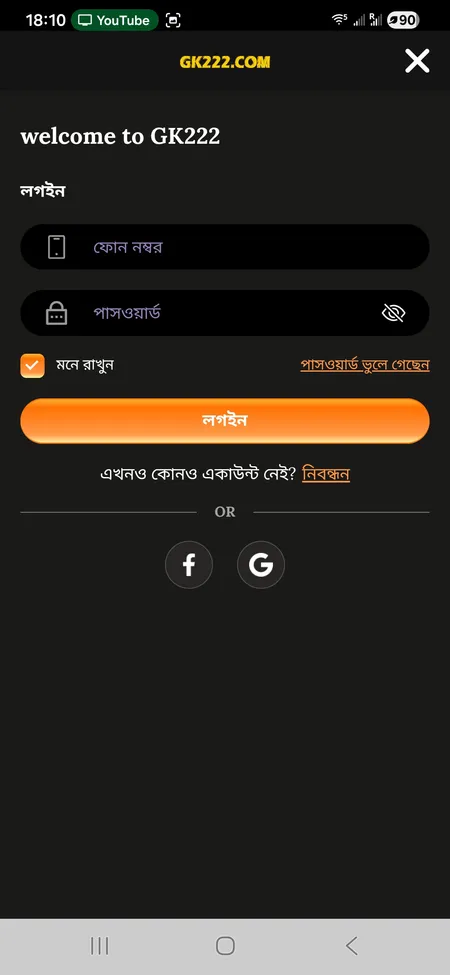
GK222 login form with phone and password fields

The GK222 login screen: phone number field, password field, Remember Me checkbox, Forgot Password link, and social sign-in buttons for Facebook and Google.

Login Methods Available

GK222 supports three ways to authenticate:

Method Where Available Notes
Phone number + password Web and app Primary method; OTP used for verification
Facebook Web and app One-click via Facebook account
Google Web and app One-click via Google account

For most Bangladesh players the phone-number login is the fastest option because it ties directly to the mobile number registered during sign-up. Social logins (Facebook and Google) are useful if you originally created your account through one of those providers.

Open GK222 and Sign In

Where to Find the Login Button

On the web version (gk222.io or any mirror): the Login button appears in the top-right corner of the header alongside the Register button. Both are labeled in Bengali - 'লগইন' and 'নিবন্ধন' - but the layout is identical regardless of language.

On the mobile browser: the same header layout applies. The site is responsive, so the buttons remain visible at the top of the screen.

In the Android app: after launching the APK, the home screen shows Login and Register buttons prominently. The side hamburger menu also contains a Login entry.

The side menu (hamburger icon) contains a direct link to the login form, alongside Deposit, Withdraw, Help Center, and Online Chat.

Step-by-Step: Signing In on the Website

Follow these steps to log in through any browser on desktop or mobile:

  1. Go to gk222.io or any active mirror domain.
  2. Click the 'লগইন' (Login) button in the top-right header.
  3. The login modal opens with two fields: Phone Number and Password.
  4. Enter the phone number you registered with (Bangladeshi format).
  5. Enter your password (case-sensitive).
  6. Tick 'মনে রাখুন' (Remember Me) if you want the session saved on this device.
  7. Click the 'লগইন' button to submit.
  8. If credentials match, you are redirected to the home screen with your balance visible.

If you see an error after step 8, double-check the phone number format and confirm Caps Lock is off before re-entering the password.

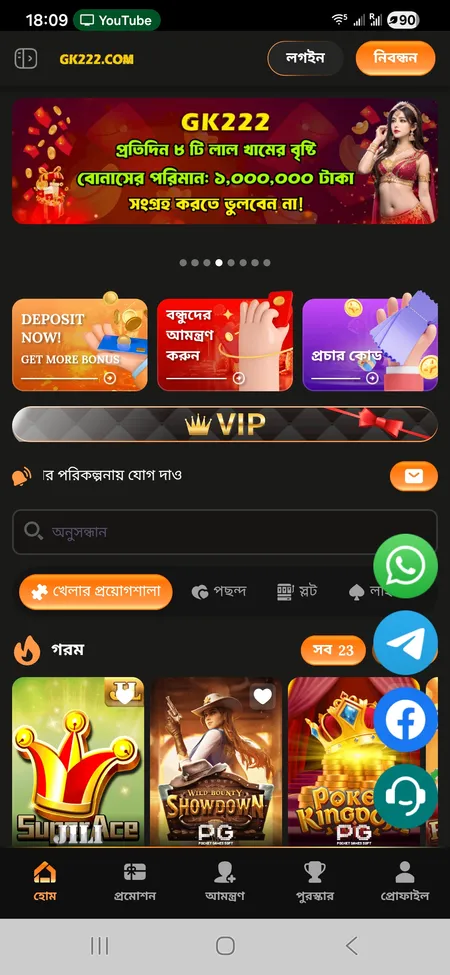
GK222 home screen after successful login

After login the home screen displays your BDT balance, VIP level, quick access to Deposit and Withdraw, and the Hot Games grid.

Try GK222 Now

Logging In via the Mobile App

The GK222 Android APK delivers a slightly faster login experience compared to the browser because it caches your session token locally. Steps:

  1. Open the installed GK222 app (package: prod.app_gk22bdtf6.com).
  2. Tap Login on the welcome screen.
  3. Enter phone number and password in the respective fields.
  4. Tap 'লগইন'. The app authenticates and loads your profile within seconds.

The app also supports Facebook and Google sign-in through the same 'OR' button row shown in the web form. If you enabled 'Remember Me' previously, the app re-authenticates automatically on relaunch without asking for credentials again - until you manually log out or clear app data.

Need to install the app first? Visit the GK222 app download page for the latest APK and setup instructions.

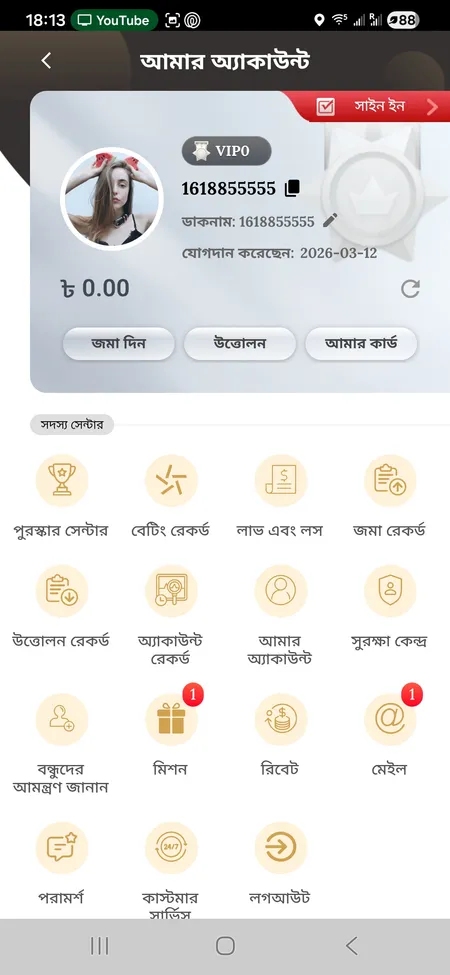
GK222 account menu showing profile and member center

After app login: your account menu shows User ID, VIP level, balance, and quick links to Deposit, Withdraw, Reward Center, and Security Center.

Password Recovery: Regaining Access

If you forget your password, GK222 does not have a fully automated self-service reset flow visible on the public login page. The recommended recovery path is:

  1. Click 'পাসওয়ার্ড ভুলে গেছেন' (Forgot Password) on the login screen.
  2. Follow any on-screen OTP prompt linked to your registered phone number.
  3. If the prompt does not appear or the number is inaccessible, contact 24/7 support via:
    • Telegram: official channel GK222OFC
    • WhatsApp: floating button on the site
    • Online chat: accessible from the side menu

Support agents can verify your identity through registered details (User ID, full name, phone) and assist with resetting credentials. Account recovery through third-party channels (unofficial Telegram groups, Facebook pages) is not safe - only use the channels listed above.

GK222 support operates 24/7 in Bengali and English. Recovery requests made through official Telegram (GK222OFC), WhatsApp, or online chat are typically handled quickly any time of day.

Common Login Errors and How to Fix Them

Error Likely Cause Fix
'Incorrect password' Typo or wrong case Re-enter carefully; check Caps Lock
'Account not found' Wrong phone number format Use the exact number from registration
Page does not load Domain blocked by ISP Try an alternative mirror (gk222.com, gk222vip.com)
Social login fails Browser cookie issue Clear cookies or switch to another browser
App crashes on login Outdated APK version Re-download latest APK from the official site
Session expires immediately 'Remember Me' not ticked Enable the option or log in again

If a domain is unavailable in your region, GK222 maintains several mirrors including gk222.com, gk222vip.com, gk222com.com, and others with identical functionality. Cloudflare infrastructure and DV SSL (Google Trust Services) protect all active domains.

Access GK222 via Official Link

Security Features Tied to Login

GK222 builds several layers of protection around the login process and post-login account management. Key features found in the Security Center ('সুরক্ষা কেন্দ্র'):

  • Login Password - change at any time from Security Center; affects web and app access equally.
  • Transaction Password - a separate PIN required before any withdrawal or e-wallet binding. This means a compromised login password alone cannot drain your funds.
  • E-Wallet Binding - you must bind your bKash or Nagad wallet inside Security Center before withdrawals are enabled. The wallet name must match the full name in your profile and any uploaded documents.
  • OTP Verification - used during account registration and password recovery; tied to your registered phone number.
  • Anti-fraud rules - only one account per phone number, IP address, payment card, and full name is allowed. Duplicate accounts detected by the system can result in bonus cancellation or account suspension.

GK222 also warns users explicitly not to transfer funds to anyone contacting them through private Telegram or Facebook messages claiming to represent the casino. All legitimate payment channels go through the official in-app deposit interface.

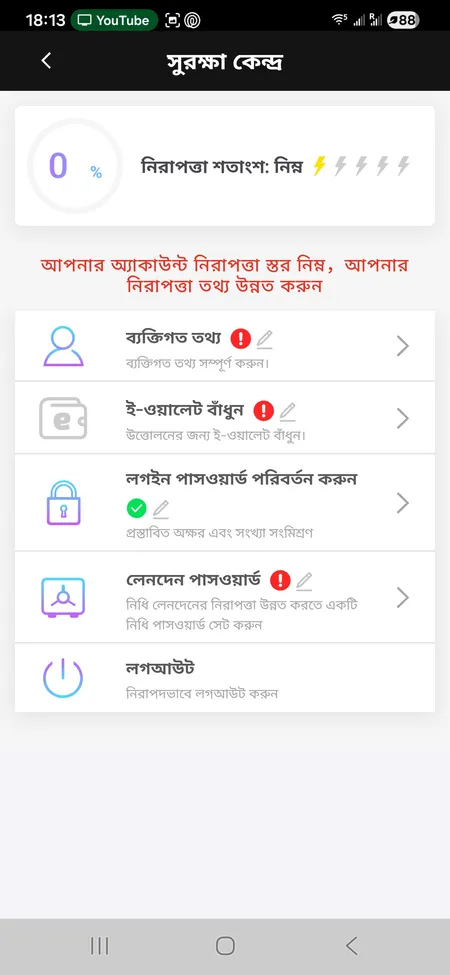
GK222 Security Center showing account protection options

Security Center: security percentage indicator, personal information, e-wallet binding, login password change, and transaction password setup.

Logging In on Different Devices

GK222 is accessible across all common device types without requiring separate accounts:

  • Desktop browser (Windows/Mac): full-featured web interface at gk222.io.
  • Mobile browser (Android/iOS): responsive design with the same login form and navigation.
  • Android app (APK): native app with faster session handling and push-style Telegram notifications.
  • iOS: no dedicated App Store listing is mentioned in official materials; iOS users typically access the platform via Safari or Chrome mobile browser.

One login, one balance, one VIP progress - everything syncs in real time across whichever device you use. If you are signed in on both the app and a browser simultaneously, both sessions reflect the same balance and betting history.

For a full comparison of app versus browser experience, see the GK222 app page.

What to Do After Logging In

Once inside your account, the most common first actions are:

  1. Check your balance - displayed in BDT at the top of the profile screen.
  2. Claim daily rewards - go to Reward Center and tap Sign In to collect your daily bonus.
  3. Check active missions - the Missions tab shows ongoing tasks with Valid Bet targets and BDT rewards.
  4. Review promotions - the Promotion section lists current offers including Red Envelope Rain (12 waves daily), the Dreamer Fund (50,000 BDT daily prize), and VIP bonuses.
  5. Make a deposit - minimum 100 BDT via bKash or Nagad; always submit your Trx-ID after transferring.

If you have not yet explored the full bonus catalog, the GK222 promotions page has details on all current offers including the 82% first-deposit bonus and the referral program paying up to 1,000 BDT per invited friend.

Sign in to GK222 and access 19,000+ games, daily BDT bonuses, and a VIP program with 50 levels - all from your phone.

Login FAQ

What details do I need to log in to GK222?

You need the phone number you registered with and your account password. Alternatively you can use Facebook or Google if you signed up via those providers.

I forgot my GK222 password - what do I do?

Click 'Forgot Password' on the login screen and follow the OTP prompt. If your phone number is no longer accessible, contact 24/7 support via Telegram (GK222OFC), WhatsApp, or live chat.

Can I stay logged in on my phone?

Yes. Tick 'Remember Me' (মনে রাখুন) during login. The app caches your session and signs you in automatically on relaunch until you manually log out.

The login page is not loading - what should I try?

Your ISP may be blocking the main domain. Try an alternative mirror: gk222.com, gk222vip.com, gk222com.com, or gk222app.com. All mirrors carry the same interface and account data.

Can I be logged in on multiple devices at the same time?

Yes. GK222 allows simultaneous sessions on the web browser and the Android app. Balance and history sync in real time across both.

Why does my login fail even with the correct password?

Check that Caps Lock is off, confirm you are using the registered phone number with the correct country format, and clear browser cache if the issue persists. If the problem continues, use the Forgot Password flow or contact support.

Is there two-factor authentication on GK222?

GK222 uses OTP (one-time password via SMS) during registration and password recovery. A separate Transaction Password is required for all withdrawals, acting as a second layer of financial security.

How do I log out of GK222?

Open the side menu or Profile section and scroll to the bottom. Tap 'লগআউট' (Logout). This ends your current session on that device only. To clear all sessions, contact support.

Does logging in on the app differ from the website?

The credentials are identical. The app loads faster, caches the session, and offers push notifications via Telegram integration. The web version works on any browser without installation.

My account was blocked after several failed login attempts - what do I do?

Contact GK222 support immediately via Telegram (GK222OFC) or live chat. Provide your registered phone number and User ID. Support operates 24/7 in both Bengali and English.